Forex trading simulator. Online backtesting tool.
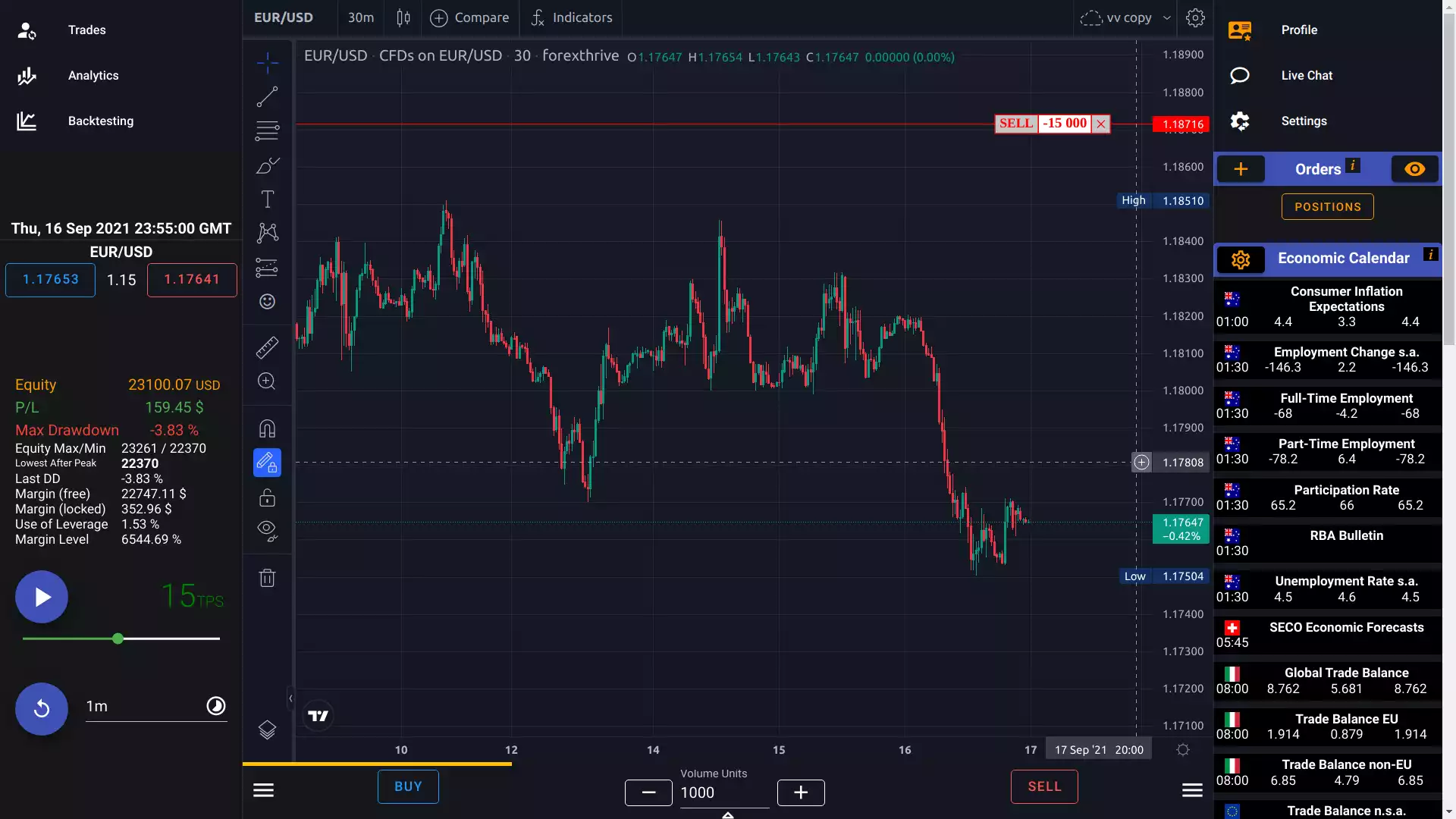
ForexThrive is a browser-based forex trading simulator: replay historical FX, crypto, and futures prices bar by bar, trade them as if they were live, and measure the results with your broker's real spread, commission, and leverage. No download, no real money, and a free tier with no credit card.
- of historical data
- 15+ yrs
- OHLC bar replay
- 1-min
- chart indicators
- 40+
- to start, no card
- $0
What is a forex trading simulator?
A forex trading simulator replays historical currency prices so you can trade them as if the market were live — without risking money. You pick a pair and a date, the chart advances candle by candle, and you open and close positions exactly as you would with a broker.
That's the difference from a demo account, which only streams today's prices in real time: testing a strategy through a trend, a range, and a crisis on a demo takes years. A simulator compresses that into hours, and lets you replay the same market as many times as you need. It also differs from a code-based backtester, which needs your strategy written as a program — a simulator tests the discretionary decisions you actually make.
ForexThrive also closes the gap between backtesting and forward testing: a session can run up to a year into the future, and when the replay reaches the present it continues on 1-minute-delayed live data — see how it works.
From hypothesis to hard numbers in four steps
- 01
Pick a market and a date
Choose an FX pair, crypto pair, or FX future and jump to any window of history — a calm range, a CPI release, a central-bank surprise.
- 02
Match your broker
Set leverage, spread, commission, and slippage per instrument, plus a maximum drawdown and margin limits. The same friction you pay live.
- 03
Replay and trade
Step bar by bar or speed the market up. Place market, limit, stop-limit, bracket, and OTA orders while economic-calendar events print as they happened. Reach today and the session keeps going on 1-minute-delayed live data.
- 04
Read the numbers
Win rate, expectancy, Sharpe, max drawdown, time in market — enough to tell whether you have an edge or just a story.
One session, from history to live market — on your schedule.
Most tools make you choose: backtest on the past, or forward test on a demo in real time. In ForexThrive it's one continuous session. A game can end up to a year in the future, so the strategy you validate on history keeps running on fresh, unseen data — with one record from the first bar to the latest.
- Session startAny date in 15+ years of history
- TodayReplay switches to live data, delayed 1 minute
- Session endUp to 1 year in the future
- 01 · Backtest
Replay history at your pace
Start a game on any date in 15+ years of data. Step bar by bar or fast-forward — every trade, drawing, and statistic is stored in the session.
- 02 · Today
Hit the present, keep trading
When the replay reaches today, the same session switches to live market data delayed by one minute. Balance, open positions, and stats carry straight over — your backtest becomes a forward test without starting again.
- 03 · Away? Catch up
Time off is never skipped
The replay engine only moves while the app is open. Close it for two weeks and those two weeks are waiting when you return: replay them up to today in a few clicks, trading every bar you'd otherwise have missed.
Run up to 5 backtesting games side by side
Each game is its own session with its own balance, trades, and statistics — and each can end in the future, so all of them roll into forward testing when they reach today. Switch between them in a click to compare different entry and exit logic, or the same strategy under different broker conditions: spread, leverage, commission.
Weeks later, you're not asking which idea felt better. You're comparing five equity curves that traded the same market.
| Game | Spread | Leverage | Comm. |
|---|---|---|---|
| 1 London breakoutBaseline | 0.8 | 1:30 | $3.50 |
| 2 London breakoutWide-spread broker | 1.6 | 1:30 | $7.00 |
| 3 London breakoutHigh leverage | 0.8 | 1:100 | $3.50 |
| 4 H1 mean reversionBaseline | 0.8 | 1:30 | $3.50 |
| 5 H1 mean reversionTighter stop, later exit | 0.8 | 1:30 | $3.50 |
Creating games — with your own dates, instruments, and trading conditions — is part of the prepaid plan. The free tier gives you one predefined game (Feb 22 – May 23, 2022) to try the engine.
A web-based simulator that respects real friction
-
Web-based, zero installs
Run the simulator in any modern browser. No native client to maintain, no version drift across machines.
-
TradingView-quality charts
40+ indicators, multi-chart compare, custom drawings stored on your device. The chart engine you already trade with.
-
Built-in game constraints
Drawdown limits and margin rules force the discipline live trading already does — without the cost.
-
Realistic trading costs
Fixed or dynamic spread, per-trade commission, and overnight swap (rollover) calculated from historical central-bank rates.
-
Advanced order types
Beyond market and limit: bracket orders that attach stop-loss and take-profit, and One-Triggers-Another (OTA) chains.
-
AI trading assistant
Ask about the chart you're replaying. Runs on your own free Google Gemini API key — no extra subscription.
What you can trade in the simulator
| Market | Instruments | Plan |
|---|---|---|
| FX majors | EUR/USD, USD/JPY, GBP/USD, USD/CHF, USD/CAD, AUD/USD, NZD/USD | Free + Prepaid |
| FX crosses | EUR/GBP, EUR/JPY, GBP/AUD and more | Prepaid |
| Crypto | BTC/USD, ETH/USD, LTC/USD, ADA/USD, AVE/USD, LNK/USD, UNI/USD | Free + Prepaid |
| FX futures | EUR-USD, USD-JPY, USD-CHF, GBP-USD — modeled on CME Micro FX (EUR-USD: 12,500 units, $1.25 per tick), with live spot–futures basis | Free + Prepaid |
Simulator vs. demo account vs. code-based backtester
Three ways to test a trading idea before real money is on the line — and what each one can and can't tell you.
| Capability | ForexThrive simulator | Broker demo account | Code-based backtester |
|---|---|---|---|
| Trade any period of past market history | |||
| Discretionary, hands-on trading | |||
| No programming required | |||
| Control time: step bar by bar or fast-forward | Automatic | ||
| Custom spread, commission, and leverage | Broker's own | Varies | |
| Hard drawdown and margin rules | Varies | ||
| Continue from backtest into forward test in one session | Forward only | Separate setup | |
| Several strategies or broker configs tested side by side | Up to 5 games | One account each | |
| Time to trade through a year of data | Hours | A year | Minutes |
Forex trading simulator questions
-
What is a forex trading simulator?
A forex trading simulator replays historical currency prices so you can place trades as if the market were live, without risking money. Unlike a demo account, which only shows today's prices in real time, a simulator lets you pick any past period and move through it at your own pace — so you can practice and backtest a strategy on years of data in days.
-
Is the ForexThrive simulator free?
Yes. Sign in with Google and you land in a free, predefined backtesting game: 3 months of history (Feb 22 – May 23, 2022) on the major FX pairs, crypto, and FX futures, with standard trading conditions and a fixed 10% maximum drawdown — no credit card. The prepaid plan ($8–$23 per month, bought in blocks and never auto-renewed) lets you create up to 5 games on any dates across 15+ years of history, run them into forward testing, add FX crosses, and customize spread, leverage, and commission.
-
Do I need to download or install anything?
No. ForexThrive runs entirely in the browser. You sign in with Google and the simulator loads — there is no desktop client, plugin, or MetaTrader setup.
-
Does the simulator use real money?
No. Every trade is simulated against historical prices. ForexThrive is not a broker, does not execute real trades, and does not provide trading signals.
-
How is a trading simulator different from a demo account?
A demo account runs on live prices, so testing a strategy across different market conditions takes months or years of real time, and you can't revisit a specific event. A simulator replays history: you choose the period, speed it up or step through it, and repeat the same market as often as you need.
-
Can I forward test a strategy in the simulator?
Yes, on the prepaid plan. When you create a game, its end date can be set up to one year in the future. The replay runs through history as a backtest, and when it reaches the present it switches to live market data delayed by one minute — so the same strategy continues as a forward test. Trades, statistics, and drawings from both phases stay in the one session.
-
What happens to a forward test when I close the app?
It pauses. The replay engine only advances while the app is open, so nothing trades without you. When you come back — a day or two weeks later — the bars you missed are waiting, and a few clicks replay them up to the present before the session continues on live data.
-
Can I test several strategies at the same time?
Yes, on the prepaid plan. You can run up to five backtesting games side by side and switch between them in a click. Each keeps its own balance, trades, and statistics — use them to compare different entry and exit rules, or the same strategy under different spread, leverage, and commission settings.
-
How realistic are the results?
The engine replays one-minute OHLC bars with the spread, commission, leverage, and slippage you set, and it charges overnight swap based on historical interest-rate differentials. It does not replay tick data, so strategies that depend on sub-minute execution, such as high-frequency scalping, can't be modeled precisely.
-
Can I backtest a strategy without coding?
Yes. You trade the replay manually, the way you would trade live, and the simulator records every position and computes the statistics. No scripting language or expert advisor is required.
-
Which markets can I practice on?
Seven major FX pairs, seven crypto pairs (BTC/USD, ETH/USD, LTC/USD, ADA/USD, AVE/USD, LNK/USD, UNI/USD), and four FX futures modeled on CME Micro FX contracts are available on every plan. FX crosses (EUR/GBP, EUR/JPY, GBP/AUD and more) can be added to games on the prepaid plan.
Open the simulator now.
Free tier loads in under a minute. No credit card.