The only setup step is pasting in a Google Gemini API key, which is free and doesn't require a credit card. Below is exactly how to get one and what to do with it.
Why ForexThrive doesn't ship a built-in AI key
The AI Assistant runs on Google's Gemini API, which serves both the Gemini and the open Gemma model families. Google's free tier has tight rate limits — as low as 5 requests per minute on some models — which means a single shared key would be exhausted by a handful of active users.
Instead, every trader brings their own key. That gives you three things:
- Privacy. Your key lives only in your browser (
localStorage). ForexThrive can't see it, can't read it, and can't use it. - No markup. Whatever you spend on Google's API, you spend directly with Google. We don't proxy, meter, or upcharge anything.
- Freedom. Start free with the default Gemma 4 model. If you want Google's most powerful model — Gemini 3 Pro — enable billing on your own Google project and select it from the dropdown. The app supports any model your key has access to.
Step 1 — Get a free Gemini API key
Takes about 60 seconds.
- Open Google AI Studio: aistudio.google.com/app/apikey.
- Sign in with any Google account (a personal Gmail works fine).
- Click Create API key.
- Pick an existing Google Cloud project, or let it create one for you.
- Copy the generated key — it starts with
AIza....
No credit card. No billing setup. The key is free out of the box for free-tier models.
Step 2 — Paste it into the AI Assistant
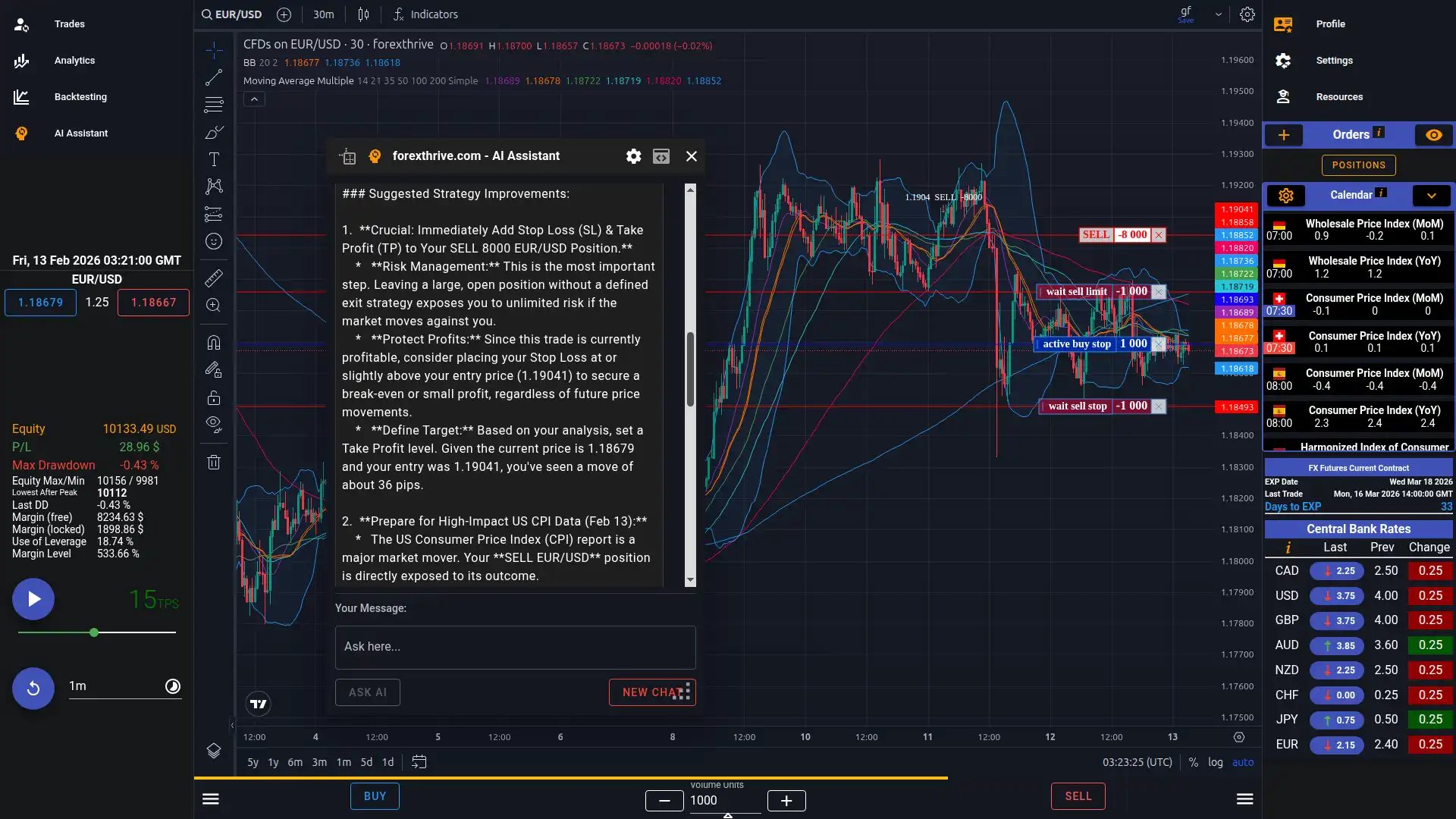
- Click the AI Assistant button in ForexThrive (the orange "head sync" icon).
- The assistant opens with a configuration panel visible.
- Paste your key into the "Paste your Gemini API Key here…" field.
- The panel auto-collapses on paste — you're ready to use it.
- The key is saved in your browser only. Use Forget Key at any time to remove it.
- Reopen Settings later via the gear icon in the toolbar.
Asking your first question
- Type a question into the "Use my indicators and define my TP/SL" textarea.
- Press Enter or click Ask AI.
- The response streams back in real time.
- The token count chip in the toolbar shows usage from the last request — hover for the prompt vs. response breakdown.
- Use New Chat to clear the conversation and reset the token counter.
- Want the chart visible while you read? Pop the assistant out via the brackets icon — it becomes a draggable, resizable floating window.
What the AI sees automatically
You don't have to describe your setup. On every message, the assistant attaches:
- A live screenshot of your chart (the TradingView canvas)
- Your account balance
- Pending orders
- Open trades
- Closed positions (your full backtest history)
- The economic calendar (only when the right drawer is open)
- Central bank rates (only when the right drawer is open)
- Conversation history (errors are filtered out)
That means you can ask "what do you think of this trade?" and the AI already has the full context. No need to paste candles, indicators, or numbers.
Choosing a model
The model dropdown defaults to a free model so the assistant works for everyone immediately. The most useful options:
| Model | Free? | When to pick it |
|---|---|---|
| gemma-4-31b-it (default) | Free | Best free option. 256K context, multimodal, ranks #3 on the open-model Arena leaderboard. |
| gemini-2.5-flash-lite | Free | High volume — 15 requests/min, 1,000/day. Good for rapid-fire questions. |
| gemini-2.5-flash | Free | Slightly stronger than flash-lite, with a 10/min cap. |
| gemini-2.5-pro | Free | Stronger reasoning, but only 5/min and 100/day. |
| gemini-3-pro-preview | Paid only | Google's most advanced model. Free tier returns a quota error. Available the moment you enable paid billing on your Google project. |
Default to Gemma 4 unless you have a reason to switch.
Want Gemini 3 Pro? Enable billing on your Google project
- Open the Google Cloud Console for the project tied to your API key.
- Add a payment method to that project (Google's guide).
- Select the paid model from the dropdown — done.
A few things to know:
- The same API key routes both free and paid traffic. You don't need a separate "paid key."
- You can mix and match — start free, upgrade later, downgrade anytime. The app behavior doesn't change.
- ForexThrive sees nothing about your billing. Google charges you directly per their published pricing.
Free-tier limits, in plain English
Google's free tier has shared and per-model caps. The numbers that matter:
- A shared 250,000 tokens-per-minute cap across all free-tier requests on your project.
- Each model has its own per-minute and per-day cap (see table above).
- The per-day counter resets at midnight Pacific time. The per-minute counter is a rolling 60-second window.
- Limits are per project, not per key — making multiple keys on the same project doesn't bypass anything.
Your live quota is visible at aistudio.google.com/rate-limit.
A note specific to Gemma 4: it's free on Google's API and has no paid tier on Google itself — paid access comes from third parties like OpenRouter (~$0.13 per million input tokens, $0.38 per million output) if you ever need to scale beyond Google's free quota.
Common errors and what to do
| Message contains | What it means | What to do |
|---|---|---|
429 + RESOURCE_EXHAUSTED + limit: 0 |
The model has no free tier (e.g., Gemini 3 Pro) | Switch to Gemma 4 / Gemini 2.5, or enable paid billing |
429 + RESOURCE_EXHAUSTED + non-zero limit |
You hit the per-minute or per-day cap | Wait the Please retry in Xs time the API tells you, or upgrade |
400 + INVALID_ARGUMENT |
The model rejected your input (often the chart screenshot or system instruction) | Try a different model |
401 / 403 / API key not valid |
Wrong, revoked, or restricted key | Re-paste from AI Studio; check for key restrictions |
Failed to fetch / network |
Connection or VPN issue | Check internet, disable VPN, retry |
The assistant always shows you the raw API error Google returned, including the suggested retry delay — read it before re-trying.
Best practices
- Stick with Gemma 4 for free use unless you need something specific.
- For rapid-fire questions on the free tier, switch to gemini-2.5-flash-lite (15/min, 1,000/day).
- Use New Chat when changing topic — chat history grows the prompt every turn, which eats your token budget.
- Watch the token count chip. If "Prompt" hits the tens of thousands, your closed-trades history is large; consider starting a new chat.
- Don't manually describe the chart — the screenshot is sent automatically.
- If you find the free tier limiting and want Gemini 3 Pro or another paid model, enable billing on your Google project. The app supports any model your key has access to, with no extra setup on our side.
Takeaway
Frequently asked questions
Is the ForexThrive AI Assistant free?
Yes. The assistant is part of the simulator, including the free tier, and runs on your own Google Gemini API key. The default Gemma 4 model and several Gemini 2.5 models work on Google's free tier within per-minute and per-day limits. You only pay Google if you enable billing to use paid models such as Gemini 3 Pro.
Where is my Gemini API key stored?
Only in your browser's localStorage. ForexThrive does not store, proxy, or meter it, and any spending happens directly between you and Google. You can remove the key at any time with the Forget Key option in the assistant's settings.
What information does the AI Assistant see?
With every message it attaches a screenshot of your chart, your account balance, pending orders, open trades, closed positions, and the conversation history. The economic calendar and central bank rates are included when the right drawer is open, so you rarely need to describe your setup yourself.
Why do I get a 429 RESOURCE_EXHAUSTED error?
If the message shows limit: 0, the selected model has no free tier, so switch to Gemma 4 or a Gemini 2.5 model, or enable billing. A non-zero limit means you hit a per-minute or per-day cap; wait for the retry delay shown in the error or switch to a higher-volume model.
Do I need a separate API key for paid models?
No. The same key handles free and paid traffic. Enable billing on the Google Cloud project that the key belongs to, then pick the paid model from the dropdown. You can move back to free models at any time, and ForexThrive never sees your billing details.